
Exclusive content
At seven in the evening, Anika was doing something she had done a hundred times before and hated every time.
She had her factory’s costing sheet open on the left half of the screen, and the buyer’s cost template on the right. The buyer wanted the quote in their format, with fabric, trims, labour, overhead and profit in fixed boxes, by Monday. Her own sheet had the same information, organised differently. So she was copying numbers across by hand, one cell at a time.
The fabric number didn’t match. Her sheet said $1.36 a piece. The buyer’s template, after she’d typed in the same consumption and price, said $1.31. She stared at it for ten minutes before she found the reason. Her sheet applied the 7 percent wastage to the fabric weight. The buyer’s template applied a smaller wastage figure to the price. Same shirt, same fabric, two different answers, and a five-cent gap that was entirely a matter of formatting.
On Monday, the buyer’s cost analyst saw her number and asked why her fabric cost was higher than their own estimate. The next forty minutes of the call were spent arguing about a difference that didn’t exist.
Anika closed the call and made a decision. She would never again maintain two versions of the truth.
This article describes what she built, and the structure of the free template that came out of it. If you quote for more than one buyer, you’ve probably felt her pain. The fix isn’t a cleverer spreadsheet. It’s a different way of organising one.
Why buyer formats never match yours
Every buyer’s costing template is a little different, and none of them matches the way a factory naturally thinks about cost. A few of the usual differences:
Units. Fabric priced per kilo in your sheet, per yard or per metre in theirs. Consumption per piece in one, per dozen in another. Prices in USD, in euro, or in taka with an exchange rate you set and they set differently.
Where the wastage goes. Some templates add wastage to the fabric quantity. Some add it to the price. Some use a single “allowance” for cutting, process loss and rejection combined. Applied differently, the same assumptions give different totals.
What CM includes. For one buyer, cut-and-make covers sewing labour only. For another it includes factory overhead, utilities and finishing. For a third, overhead is a separate line and CM is just minutes times a rate.
Where commission, finance and testing sit. One template has a line for each. Another buries them in “overhead”. Another expects them added after profit.
The grouping. Some want five boxes: fabric, trims, labour, overhead, profit. Others want twenty lines. Some want percentages of FOB. Some want a per-dozen price.
None of these differences is wrong. They’re just different views of the same underlying cost. And that’s the key idea behind the template.
The principle: one engine, many views
Most factories build costing the other way round. They have a sheet for each buyer, each with its own formulas and its own copy of the rates. When yarn prices change, someone has to remember which sheets to update. When a buyer asks for a revision, someone retypes a fresh version. Errors multiply quietly, and nobody can say which sheet is right.
The better design separates two jobs:
- The engine calculates the real cost of the garment, once, in the factory’s own logic.
- The views are output tabs that take the engine’s results and rearrange them into each buyer’s format. They contain no calculations of their own, only links.
When the engine changes, every view updates. When a new buyer arrives with a new template, you add a new view and nothing else moves. You never again retype a number into a buyer’s format, because the buyer’s format is just a different window onto the same data.
What’s inside the template
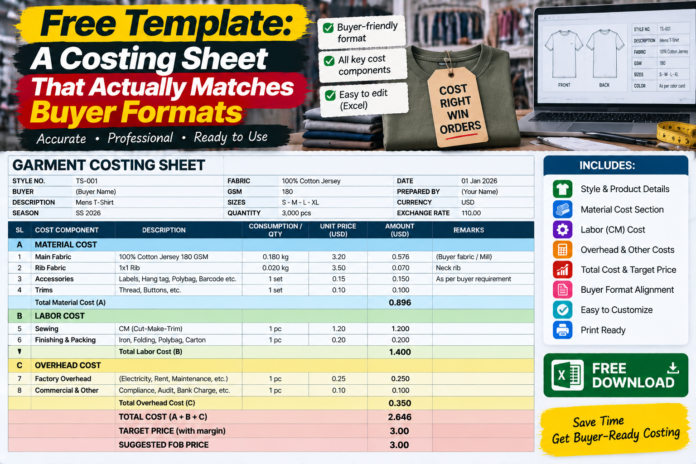
The template is a single Excel workbook with nine tabs. You don’t need macros or add-ins, just ordinary formulas.
1. Inputs. Style number, description, quantity, size range, currency, exchange rate, target margin and the buyer’s name. Every blue cell in the workbook is an input, and everything else is calculated. That one colour rule makes the sheet readable by anyone.
2. Rates. One page holding every price that changes: yarn, knitting, dyeing and finishing per kilo, trim prices, CM rate, finance rate, commission percentage. When a rate changes, you change it here, once.
3. Fabric. Consumption from measurements: body length, sleeve length, half-chest width and allowances, multiplied by GSM, plus wastage, converted to kilos and priced. A small block beside it shows the cost at the bottom and top of the GSM tolerance, so the range is always visible.
4. Trims. Every trim as a row: thread, labels, tags, polybag, carton, with a unit cost, quantity per piece and wastage. The total flows to the summary.
5. CM. Two methods side by side: a flat CM per piece, or SMV times efficiency times cost per minute. You pick one, and the sheet shows what the other would give as a sanity check.
6. Overheads and commercial. Admin, sampling, finance, logistics to port, testing and compliance, quality allowance and commission, each as its own line with its own basis.
7. Summary. Total cost, profit at your target margin, the resulting FOB, and the margin at any price you type in. This is the tab where you decide what to quote.
8. Scenarios. Pre-built sensitivities: GSM at the top of tolerance, yarn up ten percent, efficiency down five points, duty added. For each, the extra cost per piece and the share of profit it eats.
9. Buyer views. One block per buyer format, linked to the engine.
There’s also a small checks area on the Summary tab. It confirms that the buyer views add up to the same FOB as the engine, and turns red if they don’t. It catches most formula errors on the day they happen.
A worked example: one shirt, three formats
Take the same plain 180 GSM crew-neck tee used throughout this series, with a cost build-up that lands at $3.20 FOB. The figures are illustrative.
The engine’s full breakdown looks like this:
| Line | $ per piece |
|---|---|
| Yarn, knitting, dyeing and finishing (fabric) | 1.36 |
| Trims and packing | 0.21 |
| Cut and make | 0.80 |
| Admin, sampling and overheads | 0.20 |
| Finance | 0.08 |
| Commercial and logistics | 0.12 |
| Buying commission | 0.10 |
| Quality allowance | 0.06 |
| Testing and compliance | 0.08 |
| Profit | 0.19 |
| FOB | 3.20 |
Buyer A wants five boxes. The view simply groups the engine’s lines: fabric 1.36, trims 0.21, CM 0.80, overhead (admin, finance, commercial, commission, quality and testing combined) 0.64, and profit 0.19. Total 3.20.
Buyer B wants everything per dozen. The view multiplies each of those by twelve: fabric 16.32, trims 2.52, CM 9.60, overhead 7.68, profit 2.28. Total 38.40.
Buyer C wants percentages of FOB. The view divides each line by the total: fabric 42.5 percent, trims 6.6, CM 25.0, overhead 20.0, profit 5.9.
Three formats, one set of numbers, no retyping. If the fabric price changes by ten cents a kilo, all three views update at once and the checks stay green.
This is also what would have saved Anika that Monday call. Her five-cent gap came from applying wastage in two places. In the template, wastage is applied once, in the engine, and each buyer view shows it in whichever way their format expects, with a note explaining the treatment. When the analyst asked why her fabric was higher, she could have answered in one sentence: “We apply wastage to the weight rather than the price. Same total, different line.” Argument over.
Rules that keep the sheet honest
A template is only as good as the habits around it. These are the rules Anika’s factory settled on.
One source for every number. If a figure appears twice, one of them must be a link to the other. The moment someone types a number over a formula, the engine and the views drift apart. Lock the formula cells and leave only the blue inputs editable.
Keep units explicit. Label every price with its unit: per kilo, per metre, per piece, per dozen. Most costing errors that survive to the quote are unit errors, such as kilos treated as pieces or a dozen treated as a single item.
Record how each buyer treats each line. On each buyer view, add a short note: where wastage sits, what CM includes, which exchange rate applies. It costs minutes to write and saves the same argument every season.
Version, don’t overwrite. Save each quote with a date and a version number, and keep a small change log tab: what changed, why, and who approved it. When a buyer asks why you quoted differently last season, you’ll have the answer.
Show the range, not just the point. Always show the margin at the top of the GSM tolerance and at your likely yarn and efficiency assumptions. A single clean number feels reassuring and hides the risks. A range tells the truth.
Check before you send. The check cells exist to be glanced at. Make it a habit that no quote goes out with a red check.
Making it yours
The template is a starting point, not a finished product. A few ways factories usually adapt it:
- Add a trim library with your regular suppliers’ prices, so new styles pull from it automatically.
- Add a wash and embellishment tab for styles that need them, feeding into the engine like any other cost.
- Replace the flat overhead lines with your factory’s real allocation, based on minutes or output.
- Add a duty block for markets where your buyer’s landed cost matters to the conversation, with scenarios for the preference rules that may change.
- Add a column for the actual cost after the order ships, so next season’s quote starts from evidence.
That last one is the most valuable. Once actual costs sit beside the quoted ones, the sheet starts to learn. You can see that a certain mill’s fabric runs heavy, or that a style’s efficiency was lower than planned, and the next quote corrects for it.
The honest limits
A spreadsheet is still a spreadsheet. It won’t stop someone typing a wrong number, and it can’t tell you whether a price is wise to quote. It also doesn’t replace judgement: the buyer’s mood, your factory’s load, the long-term value of the relationship. Those are decisions only you can make, and the template’s job is to give you clean numbers to make them with.
And a master sheet with many views takes some discipline to maintain. If people start editing the buyer views directly, or copying the workbook to make quick changes, the whole advantage is lost. The structure only works if everyone agrees that the engine is the single source of truth.
The figures in this article are illustrative. Replace them with your own before you use the sheet for a real quote.
Back to Anika
Three months after that Monday call, a new buyer sent Anika their costing template. It had twenty-two lines, a per-dozen price, wastage applied to the trim quantities, and an exchange rate quoted to four decimal places.
A year earlier, that would have been a lost evening. This time she added one tab, linked each line to the engine, wrote three notes about how the buyer treated wastage and CM, and checked that the totals matched. The whole thing took forty minutes, and the first time the buyer’s analyst compared her numbers with their own estimate, they matched to the cent.
“That’s the first time a supplier’s sheet has agreed with ours without a call,” the analyst said.
It wasn’t magic. It was one engine, many views, and a habit of never typing the same number twice. The best costing sheet isn’t the one with the most formulas. It’s the one that lets you spend your time on the conversation about the price instead of the argument about the spreadsheet.